Apple Podcasts charts
Scrape Apple Podcasts / iTunes charts — Top Podcasts ranks and movement
Snapshot public Apple Podcasts Top Podcasts charts by storefront, then optionally emit one source-linked movement report when a saved monitor sees new, changed, or dropped ranks. This Actor reads public Apple Podcasts/iTunes chart JSON. It is not a keyword search, episode catalog, or collection-ID watchlist tool — that work belongs on Apple Podcasts Scraper. It is not a review collector — that job belongs on Apple Podcasts Reviews Scraper.
Open Input → Start. Defaults: US + limit 1, movement OFF ≈ $0.003. From $3.00 / 1,000 rows ($0.003 per raw row; $2.50 per movement report).
The live Input tab already has that cheap snapshot. Leave generateMovementReport off until a saved monitor needs it — the $2.50 report is blocked by the default $0.05 cap. For keyword search, episodes, or watchlists, start on Apple Podcasts Scraper instead.
Open Input → Start Store listing
Charts versus show and episode scrape
Use this page when the job is storefront rank: who is on a Top Podcasts chart, at what position, and whether that position moved since the last poll. Use Apple Podcasts Scraper when the job is finding shows by keyword, refreshing known collection IDs, or attaching recent episode titles. Use Apple Podcasts Reviews Scraper for public ratings and review text on IDs you already have.
| Chart Scraper | Apple Podcasts Scraper | Reviews Scraper | |
|---|---|---|---|
| Intent | Top Podcasts chart rows and optional rank movement | Search, chart snapshot, watchlist lookup, optional episodes | Public review rows, optional rating report, delta monitor |
| Chart input | countries, optional genreId, limit |
chartRequests with country, feedType, limit |
Not a chart tool |
| Show / episode scrape | Not in this Actor | searchTerm, lookupIds, includeEpisodes |
Not in this Actor |
| Default row | chart_rank |
Search / lookup / chart snapshot rows | podcast_review |
| Movement / report | One report row when a monitorKey sees new, changed, or dropped positions |
Snapshot only; no movement report fields | One podcast_review_report when generateReport is true |
None of these Actors is affiliated with or endorsed by Apple. Rank movement is descriptive evidence, not a forecast, audience estimate, advertising guarantee, or provider approval.
Use cases
- Monitor Apple Podcasts chart movement for podcast growth, agency, network, or research work.
- Generate a sponsor-evidence report when a rank change needs source-linked context.
- Build a media-buyer shortlist from a focused chart result (country, optional genre, bounded depth).
- Produce a public show discovery feed from Top Podcasts rows for a downstream workflow.
- Run a recurring baseline, then poll for new, changed, or dropped positions only.
- Capture a low-cost raw chart snapshot for archival or later analysis.
For keyword discovery and collection-ID refresh, go to Shortlist podcasts for outreach. For joining scraper chart snapshots yourself, see Track Apple Podcasts charts over time.
Raw chart snapshot
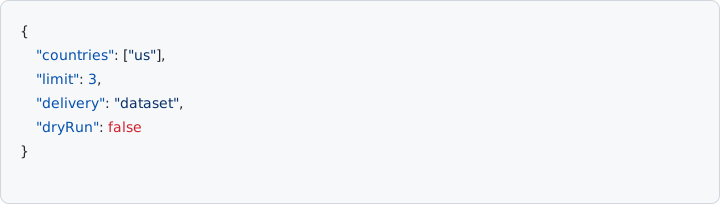
The default path delivers source-linked chart_rank rows. Start with one country and limit 1. Leave generateMovementReport off on the first paid run — that snapshot is ≈ $0.003.
{
  "countries": ["us"],
  "limit": 1,
  "generateMovementReport": false,
  "delivery": "dataset",
  "dryRun": false
}
Published raw fields: actorName, rowType, billingEventName, country, rank, showId, showName, artistName, sourceUrl, fetchedAt, plus legacy aliases name, artist, and collectionId. There is no separate output schema on the Store page. README sample (placeholder show data):
{
  "actorName": "apple-podcast-chart-tracker",
  "rowType": "chart_rank",
  "billingEventName": "apify-default-dataset-item",
  "country": "us",
  "rank": 12,
  "showId": "123456",
  "showName": "Example Podcast",
  "artistName": "Example Network",
  "sourceUrl": "https://podcasts.apple.com/us/podcast/id123456",
  "fetchedAt": "2026-08-01T00:00:00.000Z",
  "collectionId": "123456",
  "name": "Example Podcast",
  "artist": "Example Network"
}
countries accepts at most 20 unique two-letter codes. Each country is fetched with a timeout and bounded retry. limit is capped at 200. genreId is optional (empty = overall chart; 1321 is the published News example).
Run this US + limit 1 chart snapshot on Apify Input
Movement monitor
For recurring rank movement, set a stable monitorKey and generateMovementReport to true, then raise maxChargeUsd above $2.50 (the live default cap is $0.05 so a movement report fails closed until you do). The first baseline_only run stores state without dataset rows or charges.
{
  "countries": ["us", "gb"],
  "genreId": "1321",
  "limit": 50,
  "monitorKey": "weekly-news-us-gb",
  "generateMovementReport": true,
  "initialRunMode": "baseline_only",
  "maxChargeUsd": 3,
  "dryRun": false
}
A later poll emits at most one podcast_chart_movement_report row for all observed changes. Unchanged polls emit zero rows and zero charges. A failed source is not treated as a mass drop. emit_backfill reports the initial current positions once. Leave emitRawRows false unless the monitor also needs the legacy chart rows.
{
  "actorName": "apple-podcast-chart-tracker",
  "rowType": "podcast_chart_movement_report",
  "billingEventName": "podcast-chart-movement-report",
  "monitorKey": "weekly-news-us-gb",
  "initialRun": false,
  "fetchedAt": "2026-08-01T00:00:00.000Z",
  "changedCount": 1,
  "newCount": 1,
  "droppedCount": 0,
  "changes": [
    {
      "changeType": "changed",
      "country": "us",
      "showId": "123456",
      "showName": "Example Podcast",
      "previousRank": 18,
      "currentRank": 12,
      "rankDelta": 6,
      "sourceUrl": "https://podcasts.apple.com/us/podcast/id123456"
    }
  ]
}
State is isolated by monitorKey and is saved only after webhook and dataset delivery succeed. Use delivery: "webhook" only after the movement-report shape is validated. Webhook delivery does not replace dataset delivery.
Configure a movement monitor on Apify Input
How is Apple Podcasts Chart Scraper different from Apple Podcasts Scraper?
Chart Scraper is storefront Top Podcasts rankings only: raw chart_rank rows, or one movement report when a saved monitor sees new, changed, or dropped positions. It does not search by keyword, look up collection IDs, or attach episode catalogs. Apple Podcasts Scraper is the search, episode, and watchlist actor; its chartRequests path is a rank snapshot and does not emit movement reports. Apple Podcasts Reviews Scraper reads public Customer Reviews RSS for collection IDs you already have.
What does a raw chart snapshot contain?
Each delivered raw row has rowType chart_rank. Published fields include country, rank, showId, showName, artistName, sourceUrl, fetchedAt, plus legacy aliases name, artist, and collectionId. Sample rows are source-linked to an Apple Podcasts URL. There is no separate output schema on the Store page. Rank movement is descriptive evidence, not a forecast, audience estimate, or advertising guarantee.
When does a movement report emit, and what does it include?
Set a stable monitorKey and generateMovementReport to true. A baseline_only first run stores state with zero rows and zero charges. Later unchanged polls emit zero rows and zero charges when emitRawRows is false. A later poll that sees new, changed, or dropped positions emits at most one podcast_chart_movement_report row. That row includes monitorKey, changedCount, newCount, droppedCount, and a changes list with changeType, country, show identity, previousRank, currentRank, rankDelta, and sourceUrl. A failed source is not treated as a mass drop. emit_backfill emits one initial report of current positions.
How many countries and ranks can I request?
The published input schema has no required array. Runtime still fetches the default storefront when countries is omitted. additionalProperties is false. Live input schema fields:
| Field | Type | Default | Notes |
|---|---|---|---|
countries |
string[] | ["us"] |
ISO-3166-1 alpha-2 codes. At most 20 unique values. Schema prefill is us. |
genreId |
string | empty | Optional Apple-internal genre ID. Empty = overall chart. 1321 is the published News example. |
limit |
integer | 1 | Chart depth per country, capped at 200. Live prefill is 1 (≈ $0.003 with movement off). |
monitorKey |
string | empty | Stable state namespace. Movement reports need this plus generateMovementReport. |
generateMovementReport |
boolean | false | Emit one report row only for new, changed, or dropped positions. |
initialRunMode |
string | baseline_only |
Enum: baseline_only or emit_backfill. |
emitRawRows |
boolean | false | In movement mode, also deliver legacy chart_rank rows. Leave false for zero-charge unchanged polls. |
maxChargeUsd |
number | 0.05 | Fail closed before delivery when the estimated charge exceeds the cap. Default allows the cheap snapshot and blocks an accidental $2.50 movement report until you raise it. |
delivery |
string | dataset |
Enum: dataset or webhook. |
webhookUrl |
string | — | Required when delivery is webhook. Only http and https URLs are accepted. |
dryRun |
boolean | false | Fetch and format without dataset, webhook, charge, or state delivery. |
Do not send unpublished aliases such as searchTerm, lookupIds, includeEpisodes, chartRequests, feedType, podcastIds, or an RSS URL field. countries accepts at most 20 unique ISO-3166-1 alpha-2 codes per run (for example us, gb, jp, or de). Unsupported storefronts produce a warning and are never interpreted as a mass drop from the saved baseline. Storefronts differ: see charts and search by country for why a US chart is not a GB or JP chart.
Start a chart run on Apify Input
How is Apple Podcasts Chart Scraper priced?
Billing is pay-per-event. The live Store card is from $3.00 / 1,000 apify-default-dataset-items. Published events are apify-default-dataset-item at $0.003 per delivered raw chart row and podcast-chart-movement-report at $2.50 per delivered movement report. You are not charged for Apify platform usage, only the fixed event price. The cheapest first paid snapshot is US + limit 1 with movement OFF ≈ $0.003. maxChargeUsd defaults to 0.05 and fails closed before delivery when the estimate exceeds the cap. Unchanged monitor polls emit zero rows and zero charges when emitRawRows is false. Dry runs fetch and format without dataset, webhook, charge, or state delivery.
Open Input → Start. US + limit 1, movement OFF ≈ $0.003. From $3.00 / 1,000 rows ($0.003 per raw row; $2.50 per movement report).
See Apple Podcasts Chart Scraper pricing on Apify
How does Apple Podcasts Chart Scraper deliver dataset, webhook, and dry-run output?
delivery defaults to dataset and writes billable rows to the Apify default dataset. webhook sends the same payload to an http or https webhookUrl first, then writes those billable rows to the default dataset. A non-2xx webhook response fails the run before dataset delivery and prevents state commit. Webhook delivery does not replace dataset delivery. The published enum is dataset or webhook. dryRun fetches and formats the result without dataset, webhook, charge, or state delivery. Sibling webhook contracts differ: see Deliver Apple Podcasts results with webhooks.
Open Apple Podcasts Chart Scraper Input on Apify
Does Apple Podcasts Chart Scraper search by keyword, look up collection IDs, or attach episode catalogs?
No. Published inputs are countries, optional genreId, and limit, plus monitor fields. additionalProperties is false, so unpublished searchTerm, lookupIds, includeEpisodes, chartRequests, and feedType fields are not accepted. Use Apple Podcasts Scraper for keyword search, collection-ID watchlists, recent episodes, and chartRequests snapshots. Use Apple Podcasts Reviews Scraper for public ratings on IDs you already have.
Can Apple Podcasts Chart Scraper snapshot episode rankings with feedType podcast-episodes?
No. This Actor reads public Apple Podcasts/iTunes Top Podcasts chart JSON. The published schema has no feedType field. For official episode rankings, use Apple Podcasts Scraper chartRequests with feedType podcast-episodes. That path is a rank snapshot and does not emit movement reports. See How to get Apple Podcasts chart metadata from Apple/iTunes endpoints and the episode metadata export workflow.
What is the difference between baseline_only and emit_backfill on a Chart Scraper monitor?
Both require a stable monitorKey with generateMovementReport true. baseline_only is the default initialRunMode: the first run stores state with zero dataset rows and zero charges. emit_backfill emits one initial podcast_chart_movement_report of the current positions once. Later polls emit at most one report when ranks are new, changed, or dropped. State is isolated by monitorKey and is saved only after webhook and dataset delivery succeed.
Configure a movement monitor on Apify Input
Does an unchanged Chart Scraper monitor poll charge for dataset rows?
No, when emitRawRows is false. Unchanged polls emit zero rows and zero charges. Leave emitRawRows false unless the monitor also needs the legacy chart_rank rows. A baseline_only first run also stores state with zero rows and zero charges. Dry runs fetch and format without dataset, webhook, charge, or state delivery. The billed events are apify-default-dataset-item at $0.003 and podcast-chart-movement-report at $2.50.
Is a failed Chart Scraper storefront treated as a mass drop from the saved baseline?
No. Each country is fetched with a timeout and bounded retry. Unsupported storefronts produce a warning and are never interpreted as a mass drop from the saved baseline. A failed source is not treated as a mass drop. Rank movement is descriptive evidence, not a forecast, audience estimate, advertising guarantee, or provider approval.
Does Apple Podcasts Chart Scraper require a proxy, Apple ID, or private dashboard?
No. The Actor reads public Apple Podcasts/iTunes chart JSON. It does not require account sessions, browser automation, or private podcast dashboards. No proxy is required. It is not affiliated with or endorsed by Apple.
Run a chart snapshot on Apify Input
Can I pass a collection ID or an RSS feed URL into Apple Podcasts Chart Scraper?
No. additionalProperties is false. Published inputs do not accept lookupIds, podcastIds, searchTerm, or an RSS URL field. For collection-ID refresh use Apple Podcasts Scraper lookupIds. For a known show’s published catalog, read public RSS or use RSS & Atom Feed Extractor. For public ratings on IDs you already have, use Apple Podcasts Reviews Scraper. See RSS vs Apple Podcasts Scraper.
Does Chart Scraper genreId filter search results or collect review text?
No. genreId is an optional Apple-internal genre ID on Top Podcasts charts only (1321 is the published News example). Leave it empty for the overall chart. This Actor does not document genre filters on keyword search, and it does not collect review text. Apple Podcasts Scraper searchTerm has no published genre filter. Apple Podcasts Reviews Scraper reads Customer Reviews RSS for collection IDs you already have.
Related pages
- Apple Podcasts chart rank movement and previous rank CSV
- Apple Podcasts chart scraper — query-intent page for country rank and movement
- Apple Podcasts Scraper — iTunes search, episodes, and watchlists
- iTunes podcast scraper: cheapest Apple Podcasts first paid run
- Apple Podcasts Reviews Scraper — ratings and review monitoring
- Article Content Extractor — news and blog HTML, not charts
- Apple Podcasts reviews scraper
- How to get Apple Podcasts chart metadata from Apple/iTunes endpoints — scraper
chartRequestssnapshots - Track Apple Podcasts charts over time
- Apple Podcasts charts and iTunes Search by country
- Deliver Apple Podcasts results with webhooks
- Apple Podcasts search discovery (iTunes Search API)
- Refresh Apple Podcasts watchlists (iTunes Lookup API)
- Apple Podcasts dataset fields
- Export Apple Podcasts episode metadata via Apple/iTunes endpoints
- RSS feed vs iTunes Search API
- One-time export vs iTunes watchlist lookup
- RSS vs Apple Podcasts Scraper
- Shortlist podcasts for outreach
- Apple Podcasts Scraper FAQ
- Apple Podcast Episode Watchlist — new episode alerts.
- Podcast Media Buyer Shortlist Scraper — RSS show candidates.
- Apple Podcasts Category Benchmark — RSS-fed category benchmark.
- Tools