Apple Podcasts reviews
Scrape Apple Podcasts / iTunes reviews for shows you already have
Fetch the official Apple/iTunes Customer Reviews RSS JSON for the show URLs or collection IDs and storefronts you pass, then deliver source-linked podcast_review rows or one podcast_review_report. This Actor is a reputation collector for shows you already have. It is not a keyword search, episode catalog, or Top Podcasts rank tool — those jobs belong on Apple Podcasts Scraper and Apple Podcasts Chart Scraper.
Open Input → Start. Prefill × 1 page, report OFF ≈ ≤$0.15; cap $0.50. From $3.00 / 1,000 rows ($0.003 per raw review; $1.50 per report).
The live Input tab is prefilled with an Apple Podcasts URL. Keep generateReport off on the first paid run. Raise the $0.50 cap before turning on the $1.50 report. Get extra collection IDs from Apple Podcasts Scraper search if you need more than one show.
Open Input → Start Store listing
Reviews versus search and charts
Use this page when the job is reputation: public ratings and review text for known shows, a bounded snapshot, a summary report, or a scheduled delta of new or changed reviews. Use Apple Podcasts Scraper to find collection IDs by keyword or refresh a watchlist. Use Apple Podcasts Chart Scraper for storefront Top Podcasts ranks and movement. Shopify App Store and G2/Capterra review pages belong on the Review Intelligence pack, not here.
| Reviews Scraper | Chart Scraper | Apple Podcasts Scraper | |
|---|---|---|---|
| Intent | Public review rows, optional rating report, delta monitor | Top Podcasts chart rows and optional rank movement | Search, chart snapshot, watchlist lookup, optional episodes |
| Primary input | podcastIds, countries, maxPagesPerPair |
countries, optional genreId, limit |
searchTerm, lookupIds, chartRequests |
| Default row | podcast_review |
chart_rank |
Search / lookup / chart snapshot rows |
| Optional report | One podcast_review_report when generateReport is true |
One movement report when a monitorKey sees new, changed, or dropped ranks |
None |
None of these Actors is affiliated with or endorsed by Apple. Review text is public source material for reputation and market research. Do not use the output to target individual reviewers. The Actor does not infer private reviewer identity.
Use cases
- Reputation monitoring and collection of public podcast reviews for networks and brands.
- Generating sponsor-evidence exports that link public review samples to source URLs.
- Building media-buyer shortlists using topic, country, cadence, and public-fit signals.
- Low-cost raw review checks for quick sentiment or activity snapshots.
- High-value review summary reports for handoff to research or commercial workflows.
- Scheduled delta monitoring to emit only new or changed reviews after an initial baseline run.
Get collection IDs first with iTunes Search discovery or a iTunes Lookup watchlist refresh. Storefronts differ: see charts and search by country.
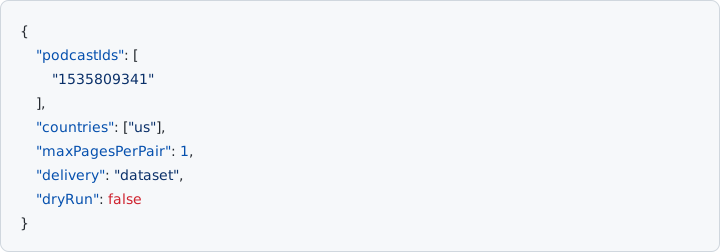
Low-cost raw review check
The default path keeps raw review behavior and a small page cap. mode defaults to snapshot. generateReport stays false so canonical rows are the raw review array.
{
  "podcastIds": ["https://podcasts.apple.com/us/podcast/id1535809341"],
  "countries": ["us"],
  "maxPagesPerPair": 1,
  "generateReport": false,
  "maxChargeUsd": 0.5,
  "delivery": "dataset",
  "dryRun": false
}
Published raw fields: podcastId, country, page, reviewerName, rating, title, content, version, voteCount, updated, and reviewId, plus actorName, rowType, sourceUrl, fetchedAt, and billingEventName. README sample (placeholder review data):
{
  "actorName": "apple-podcast-reviews-monitor",
  "rowType": "podcast_review",
  "billingEventName": "apify-default-dataset-item",
  "podcastId": "1535809341",
  "country": "us",
  "page": 1,
  "reviewerName": "public-reviewer",
  "rating": 1,
  "title": "A critical review",
  "content": "Public review text.",
  "version": "1.0",
  "voteCount": 0,
  "updated": "2026-07-31T00:00:00Z",
  "reviewId": "review-1",
  "sourceUrl": "https://itunes.apple.com/us/rss/customerreviews/id=1535809341/sortby=mostrecent/json",
  "fetchedAt": "2026-08-01T00:00:00.000Z"
}
sourceUrl is the official iTunes Customer Reviews RSS URL used for the row. Up to 25 unique podcast IDs, 10 unique country codes, and 10 pages per pair are accepted. Over-limit input fails instead of being silently truncated. A failed pair is reported in meta.warnings; successful pairs remain available.
Run this 1×1-page review check on Apify Input
High-value review report
Set generateReport to true when you need one aggregate podcast_review_report row. Raw reviews remain in the runtime reviews array and are not sent to the dataset. reportMode is summary.
{
  "podcastIds": ["1535809341", "1641234567"],
  "countries": ["us", "gb"],
  "maxPagesPerPair": 1,
  "generateReport": true,
  "reportMode": "summary",
  "maxChargeUsd": 2,
  "dryRun": false
}
The single report row includes showCountrySummaries (review count, average rating, five-point rating distribution, and latest review date for every show/country pair), totalReviewCount, lowRatingSourceLinkedSamples (up to ten rating-1 or rating-2 samples with source URLs), sourceUrls, generatedAt, fetchedAt, and billingEventName podcast-review-report. README sample:
{
  "actorName": "apple-podcast-reviews-monitor",
  "rowType": "podcast_review_report",
  "billingEventName": "podcast-review-report",
  "reportMode": "summary",
  "showCountrySummaries": [
    {
      "podcastId": "1535809341",
      "country": "us",
      "reviewCount": 2,
      "averageRating": 3,
      "ratingDistribution": { "1": 1, "2": 0, "3": 0, "4": 0, "5": 1 },
      "latestReviewDate": "2026-07-31T00:00:00Z"
    }
  ],
  "totalReviewCount": 2,
  "lowRatingThreshold": 2,
  "lowRatingSourceLinkedSamples": [
    {
      "podcastId": "1535809341",
      "country": "us",
      "reviewId": "review-1",
      "rating": 1,
      "title": "A critical review",
      "content": "Public review text.",
      "updated": "2026-07-31T00:00:00Z",
      "sourceUrl": "https://itunes.apple.com/us/rss/customerreviews/id=1535809341/sortby=mostrecent/json"
    }
  ],
  "sourceUrls": ["https://itunes.apple.com/us/rss/customerreviews/id=1535809341/sortby=mostrecent/json"],
  "generatedAt": "2026-08-01T00:00:00.000Z",
  "fetchedAt": "2026-08-01T00:00:00.000Z"
}
The published README treats this report as the handoff to source-linked sponsor evidence or a media-buyer shortlist. Those follow-on Actors are listed on the Store page; this landing stays on review monitoring.
Generate a review summary report on Apify Input
Scheduled delta monitor
Use a stable monitorKey on every scheduled run. The first baseline_only run stores the current feed with zero dataset rows and zero charge. Later runs emit only new or changed reviews; an unchanged poll remains zero rows and zero charge when emitUnchanged is false.
{
  "mode": "monitor",
  "monitorKey": "network-show-1535809341-us",
  "initialRunMode": "baseline_only",
  "emitUnchanged": false,
  "podcastIds": ["1535809341"],
  "countries": ["us"],
  "maxPagesPerPair": 1,
  "generateReport": true,
  "maxChargeUsd": 2,
  "dryRun": false
}
In mode=monitor, the runtime reviews array still holds the current fetched snapshot for diagnostics, while canonical rows contain only the new or changed delivery. State advances only after canonical pay-per-event delivery succeeds; partial source failures do not advance it. emit_backfill delivers the first snapshot instead of storing it with zero rows.
Configure a review monitor on Apify Input
How is Apple Podcasts Reviews Scraper different from the search actor and the chart actor?
Reviews Scraper reads public Apple/iTunes Customer Reviews RSS JSON for collection IDs you already have. Canonical delivery is podcast_review rows, or exactly one podcast_review_report when generateReport is true. mode=monitor can emit only new or changed reviews after a baseline. It does not search by keyword, attach episode catalogs, snapshot Top Podcasts ranks, or emit rank-movement reports. Apple Podcasts Scraper is search, chartRequests snapshots, lookupIds, and optional recent episodes. Apple Podcasts Chart Scraper is storefront Top Podcasts ranks and optional movement reports.
What input is required for an Apple Podcasts review run?
podcastIds is required. The schema sets additionalProperties to false. Live input schema fields:
| Field | Type | Default | Notes |
|---|---|---|---|
podcastIds |
string[] | required | Apple Podcasts URL (…/idNNNN) or numeric collection ID. At most 25 unique. Schema prefill is an Apple Podcasts URL for id1535809341. |
countries |
string[] | prefill ["us"] |
ISO-3166-1 alpha-2, lowercase. At most 10 unique. |
maxPagesPerPair |
integer | 1 | Review pages per show/country pair (50 reviews each). Max 10 (iTunes cap). |
mode |
string | snapshot |
Enum: snapshot or monitor. |
monitorKey |
string | — | Required at runtime when mode is monitor. Leave empty in snapshot mode. |
initialRunMode |
string | baseline_only |
Enum: baseline_only or emit_backfill. |
emitUnchanged |
boolean | false | Keep false for zero-charge unchanged polls. When true, unchanged reviews are delivered and billed. |
generateReport |
boolean | false | When true, dataset gets exactly one podcast_review_report; raw reviews stay in runtime output. |
reportMode |
string | summary |
Published enum is summary only. |
maxChargeUsd |
number | 0.50 | Fails closed before PPE delivery if the estimated delivered-row price exceeds the cap. Default covers the cheap 1×1-page snapshot; raise above $1.50 before generateReport. |
delivery |
string | dataset |
Enum: dataset or webhook. |
webhookUrl |
string | — | Required when delivery is webhook. |
dryRun |
boolean | false | Run without saving to the dataset or sending a webhook. |
Do not send unpublished aliases such as searchTerm, lookupIds, chartRequests, appUrls, reviewPageUrls, showUrls, or genreId.
Start a review run on Apify Input
What fields are on a podcast_review dataset row?
Each delivered raw row has rowType podcast_review and billingEventName apify-default-dataset-item. Published fields are podcastId, country, page, reviewerName, rating, title, content, version, voteCount, updated, and reviewId, plus actorName apple-podcast-reviews-monitor, sourceUrl (the official iTunes Customer Reviews RSS URL used for the row), and fetchedAt. Review text is public source material for reputation and market research. The Actor does not infer private reviewer identity or claim Apple endorsement. Do not join these rows to Apple Podcasts Scraper or Chart Scraper schemas as one field list; see Apple Podcasts dataset fields.
When does generateReport replace raw rows with a podcast_review_report?
Set generateReport to true. Canonical dataset delivery then contains exactly one podcast_review_report row billed as the podcast-review-report event. Raw reviews stay in the runtime reviews array and are not sent to the default dataset. The report includes reportMode summary, showCountrySummaries (review count, average rating, five-point ratingDistribution, latestReviewDate per show/country pair), totalReviewCount, lowRatingThreshold 2, up to ten rating-1 or rating-2 lowRatingSourceLinkedSamples with source URLs, sourceUrls, generatedAt, fetchedAt, actorName, rowType, and billingEventName. reportMode has no other published enum value.
How does mode=monitor emit only new or changed reviews?
Set mode to monitor and pass a stable monitorKey on every scheduled run. Default initialRunMode baseline_only stores the first snapshot with zero dataset rows and zero charge. Later runs emit only new or changed reviews. Leave emitUnchanged false so an unchanged poll stays zero rows and zero charge. In monitor mode the runtime reviews array still holds the current fetched snapshot for diagnostics, while canonical rows contain only the new or changed delivery. State advances only after canonical pay-per-event delivery succeeds; partial source failures do not advance it. emit_backfill delivers the first snapshot instead of storing it with zero rows.
What are the podcastIds, countries, and maxPagesPerPair limits?
The Actor accepts at most 25 unique iTunes collection IDs, 10 unique ISO-3166-1 alpha-2 country codes (lowercase), and 10 review pages per show/country pair (50 reviews each; iTunes cap). Over-limit input fails instead of being silently truncated. Each source request has a timeout and bounded retry for network and server errors. A failed pair is reported in meta.warnings; successful pairs remain available. This is not Chart Scraper’s 20-country Top Podcasts cap and not Apple Podcasts Scraper’s single default country on search/lookup. Storefronts differ: see charts and search by country.
How is Apple Podcasts Reviews Scraper priced on pay-per-event?
Billing is pay-per-event. You are not charged for Apify platform usage, only the fixed event price. The live Store card is from $3.00 / 1,000 apify-default-dataset-items. Published events are apify-default-dataset-item at $0.003 per delivered raw review row and podcast-review-report at $1.50 per delivered report row. There is no Actor Start event on this Actor’s Store pricing table. The cheapest first paid check is 1 show × 1 page with generateReport false ≈ ≤$0.15. maxChargeUsd defaults to 0.50 and fails closed before dataset write when the estimate would exceed the cap. A baseline_only first monitor run and later unchanged polls with emitUnchanged false emit zero rows and zero charge.
Open Input → Start. 1 show × 1 page, report OFF ≈ ≤$0.15; cap $0.50. From $3.00 / 1,000 rows ($0.003 per raw review; $1.50 per report).
See Apple Podcasts Reviews Scraper pricing on Apify
How does Reviews Scraper webhook delivery differ from dataset delivery?
delivery defaults to dataset and sends non-empty canonical rows through Actor.pushData. webhook sends the complete runtime envelope (meta, reviews, optional report, canonical rows, delivery, deliveryAudit) to webhookUrl and still sends only the canonical rows to the default dataset. Empty output does not issue a dataset POST. A non-2xx dataset response or dataset network failure fails the run; partial success is not reported as success. dryRun performs no external write. The published enum is dataset or webhook. After the payload shape is useful, see webhooks for delivery patterns used on the related Apple Podcasts actors — do not copy Chart Scraper’s webhook-first fail-closed rule onto this Actor.
The Actor uses public Apple/iTunes Customer Reviews RSS JSON only. No login, cookie, API key, CAPTCHA bypass, or private endpoint is used.
Open Apple Podcasts Reviews Scraper Input on Apify
Does Reviews Scraper accept Apple show URLs, search terms, or episode feeds?
Yes for show identity. Required input is podcastIds: an Apple Podcasts URL (…/idNNNN) or a numeric iTunes collection ID. additionalProperties is false, so unpublished fields such as searchTerm, lookupIds, chartRequests, includeEpisodes, or a public RSS feed URL are not accepted. Take a collection ID from an Apple Podcasts URL (id1535809341 becomes 1535809341) or get IDs first with Apple Podcasts Scraper search or lookupIds. This Actor does not search by keyword, attach episode catalogs, or parse publisher episode feeds. See iTunes Search discovery and episode metadata export on the search actor.
Can this Actor scrape Shopify App Store or G2/Capterra reviews?
No. This Actor reads Apple/iTunes Customer Reviews RSS JSON for podcast collection IDs and storefronts only. It does not accept appUrls, Shopify slugs, or G2/Capterra reviewPageUrls. Shopify App Store Review Scraper reads apps.shopify.com listings. G2 & Capterra Review Scraper reads public G2 and Capterra product review pages. Use the Review Intelligence pack to choose among those three sources.
Does a failed show/country pair fail the whole Reviews Scraper run?
No. A failed pair is reported in meta.warnings; successful pairs remain available. Each source request has a timeout and bounded retry for network and server errors. Empty output does not issue a dataset POST. A non-2xx dataset response or dataset network failure fails the Actor run; that is a delivery failure, not a partial source warning. In monitor mode, partial source failures do not advance stored state.
Does Reviews Scraper require login, cookies, or an Apple ID?
No. The Actor uses public Apple/iTunes Customer Reviews RSS JSON only. No login, cookie, API key, CAPTCHA bypass, or private endpoint is used. It does not infer private reviewer identity. Review text is public source material for reputation and market research. Do not use the output to target individual reviewers. It is not affiliated with or endorsed by Apple.
Run a public RSS review check on Apify Input
How does maxChargeUsd fail closed before pay-per-event delivery?
maxChargeUsd defaults to 0.50. The Actor fails closed before PPE delivery if the estimated price of the rows actually delivered would exceed the cap. For report runs it checks fetched raw rows plus the report price contract before write; maxChargeUsd is then applied to the rows actually delivered (the single report row in report mode). Raise the cap above $1.50 before generateReport. Raw mode estimates against delivered apify-default-dataset-item rows. Report delivery uses Actor.pushData with the podcast-review-report event and requires chargedCount of at least 1 or the Actor fails closed.
What happens on a baseline_only first monitor run or an unchanged poll?
The default initialRunMode baseline_only stores the first snapshot with zero dataset rows and zero charge. Later unchanged polls with emitUnchanged false also emit zero rows and zero charge. Setting emitUnchanged true delivers unchanged reviews and bills them as apify-default-dataset-item events. emit_backfill delivers the first snapshot instead of a zero-row baseline. dryRun performs no external write on any of these paths.
How to start a run
- Open taroyamada/apple-podcast-reviews-monitor Input.
- Keep the prefilled Apple Podcasts URL, or paste another show URL / numeric ID. First run: one show, one country, and
maxPagesPerPair1. - Leave
generateReportfalse for raw rows (≈ ≤$0.15; cap $0.50). Raise the cap and set the report true only when you want one billed $1.50 report row. - Leave
deliveryondataset. Switch towebhookonly after the payload shape is approved. UsedryRunto test without an external write.
Related pages
- Skip empty iTunes customer-review RSS pages by storefront
- Apple Podcasts reviews scraper — query-intent page for known shows
- Apple Podcasts Scraper — iTunes search, episodes, and watchlists
- iTunes podcast scraper: cheapest Apple Podcasts first paid run
- Apple Podcasts Chart Scraper — Top Podcasts ranks and movement reports
- Article Content Extractor — news and blog HTML, not reviews
- Apple Podcasts chart scraper
- Refresh Apple Podcasts watchlists (iTunes Lookup API) — collection IDs for
podcastIds - Apple Podcasts search discovery (iTunes Search API)
- Apple Podcasts charts and iTunes Search by country
- Deliver Apple Podcasts results with webhooks
- Apple Podcasts dataset fields
- How to get Apple Podcasts chart metadata from Apple/iTunes endpoints
- Export Apple Podcasts episode metadata via Apple/iTunes endpoints
- Shortlist podcasts for outreach
- Track Apple Podcasts charts over time
- RSS feed vs iTunes Search API
- One-time export vs iTunes watchlist lookup
- RSS vs Apple Podcasts Scraper
- Apple Podcasts Scraper FAQ
- Review Intelligence pack — podcast vs Shopify App Store vs G2/Capterra reviews
- Shopify App Store Review Scraper
- G2 & Capterra Review Scraper
- G2 reviews scraper
- Apple Podcast Episode Watchlist — new episode alerts.
- Podcast Sponsor Public Signal Report — RSS sponsor snapshots.
- Podcast Sponsor Evidence Report Scraper — RSS evidence rows.
- Tools